Scheduling · every week · 5 min read
Run the week
If Cortex makes your week, the Where the week is made guide follows it — on Cortex draft you still publish each week here. If OpsBrio makes it, the weekly roster stops being a weekly job: each driver’s pattern is typed once, a week is generated from it in a press, the exceptions are the only thing you touch, and publishing puts it on every phone at once.
Where your week is made
Settings › Where the week is made
- OpsBrio
- You build the week on Schedule and press Publish this week. Drivers see it on Home the moment you do. Every company starts here.
- Cortex draft
- You plan the week in Amazon’s Scheduling and leave it a draft there. OpsBrio reads it every half hour under a CORTEX DRAFT plate, and your Publish this week is what drivers see.
- Cortex
- You plan and publish the week in Amazon’s Scheduling. OpsBrio reads this week and next every half hour and draws what Cortex has published under a FROM CORTEX plate.
The Where the week is made guide follows each answer from the week to tomorrow’s board. The rest of this guide is the week OpsBrio makes.
The permanent schedule comes first
Schedule › Permanent schedule
One row per driver: the days they normally work and their usual wave, then Save. It is the only real typing in scheduling, and every week generated from now on reads it — a week already built is never changed by it. Changing it is Usual days & role on Ops team › Roles — the Owner, Ops Managers and HR at first; everybody with Scheduling can read it.
Generating and publishing a week
Schedule
Pick the week. Weeks start on a Sunday.
Today brings you back to this week; the arrows step a week at a time, and Jump to week… goes further.
Press Generate from pattern.
Only an empty week offers it. It lays out everybody’s normal days, with the time off and suspensions already on file applied, as a Draft nobody outside the office can see.
Read it against the demand beside each day.
Each day carries Amazon’s confirmed route count, so the week tells you where it is short before anybody is short.
Fix the exceptions.
Open a cell to change a day, or Add this day to fill a gap. Add N not on this week brings in everybody whose permanent schedule covers the week and who has no day on it yet — it only adds, and never changes a day already there.
Press Publish this week.
One press: drivers see it on Home at once, and it stays editable. Unpublish asks first, because it takes the week off the phone of everybody who can see it. From then on, a working day that comes off the week tells its driver — one push, about ten minutes later.
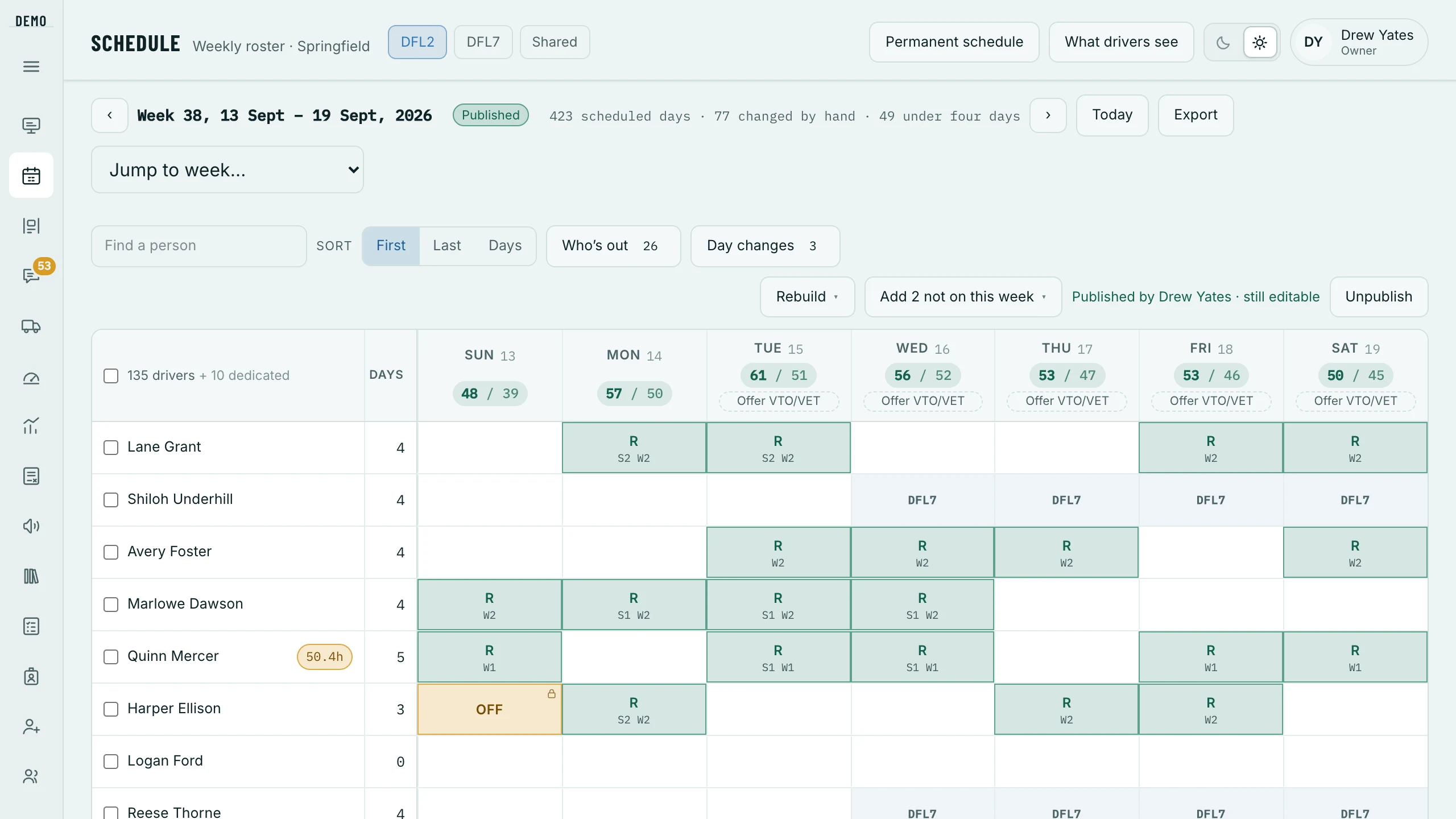
New drivers onto a week
- Ready to schedule
- Above the grid whenever somebody new can drive and has no days in the next two weeks: the days they said they can work, with All their days or Add … to put them on. The days land as Roster — then set their shift and wave in the grid.
- Add N not on this week
- Everybody whose permanent schedule covers this week and who has no day on it. A new hire with no pattern yet is not offered — give them one, or use Ready to schedule.
- Add a DA, on the board
- For a day already built: a call-out backfill, or more routes than planned. It puts the day on their weekly schedule too.
- Day changes
- Record a day change — an extra day, a dropped day or a swap — from one week through another, even on weeks nobody has built yet. End it stops it.
The Rebuild menu, and which of it you cannot undo
Schedule › Rebuild ▾
- Copy last week
- Drops every day in this week and lays last week down in its place — hand changes go. If last week had days at your other station it asks whether to bring them over, and brought over they MOVE off that station’s week. On a published week it asks you to unpublish first, then copy, then publish it again — drivers can already see a published week, and that second publish tells each driver whose day came off.
- Regenerate from pattern
- Drops every day and starts again from the permanent schedule. Unpublished weeks only.
- Clear this week
- Deletes the week itself, back to never built. Future, unpublished weeks only.
- Copy ops team’s last week
- The office’s own days only; drivers untouched.
Two stations
A person works one station on one day. To move a day, open the cell and Send to the other station this day — the day moves whole, and its shift and wave are set fresh on the other station’s week. The cell left behind names the other station, so it never reads as a free day somebody could be called in for; open it there to bring the day back.
When the week is wrong on the day
- Day changes
- A single day added, dropped or swapped — including on a week nobody has generated yet, which is the awkward case every roster has.
- Extra shifts & days off
- Offer extra shifts or voluntary time off to the drivers who qualify, and let them take it on their own phones instead of a group text and a race.
- The board
- Anything on the day itself. A call-out or a status change stays on the board — what somebody was scheduled for and what they worked are two facts you will want later — and Add a DA writes the day onto the schedule as well.