Dispatch · every day · 8 min read
Run the day
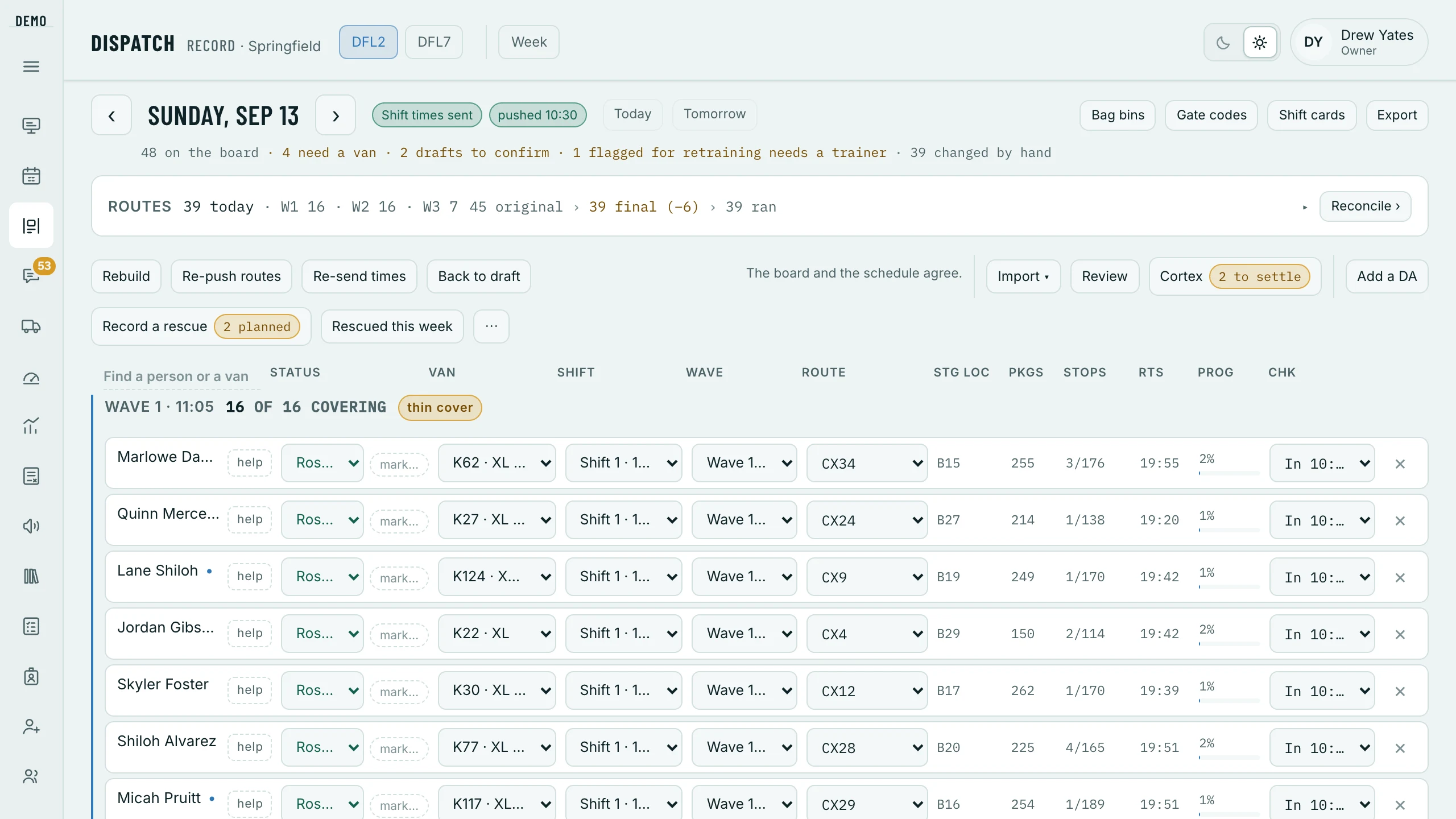
The board is the keystone: one row per driver per day, carrying their van, their route, their shift and their wave. The day runs on a clock — built and sent the evening before, routed and dispatched in the morning, watched while the routes are out, and settled once Amazon has said what it paid.
The evening before
Build tomorrow’s board.
Dispatch › Tomorrow › Build the day
It stays greyed out until the week is published — the board is built from the published schedule. Every rostered driver gets a row on the van they are first call on; where two of a van’s drivers work the same day, the lower seat keeps it and the other moves to a free van, with the reason on their row. Rebuild later lays the board down from the schedule again and leaves the rows you changed by hand alone. It asks first how to build: Auto Roster — the schedule, then Amazon’s routes to the best drivers by the six-week rank, the rest Backups — The schedule, or, where your station hands Amazon’s work blocks out in Cortex, Cortex. Afterwards Auto Roster at the top of the board fills what Amazon changes, and Overwrite from Cortex lines the board up with the blocks once they are in; the Where the week is made guide has all three.
Send shift times.
Dispatch › Send shift times
Every driver on the board gets their shift time — only the time; the route, van and wave follow in the morning. If nobody presses it, the board sends itself at the time on When the board sends itself (8:30pm unless you change it). Sending also opens tomorrow’s chat room for the drivers on the board, and says so in it. A shift time that changes after this is sent again by itself — one push to that driver about ten minutes later, held through quiet hours, and the row says so; Re-send times is for everybody.
Shift cards and the line-up sheet, if you use them.
Dispatch › Cards
Shift cards draws one picture per shift to copy into a chat or save; Line-up sheet is every driver and van by wave, with backups and rescues underneath, on one landscape page to print. Each says when the board has moved since it was drawn.
Bag bins for the morning.
Dispatch › Bag bins
Where each van’s bag goes tonight, one line per van in station order — read off tomorrow’s board, so build it first.

The morning, before dispatch
Sync the routes once Cortex has them.
The extension › Routes sync only
Today’s routes onto the board and nothing else: a route onto every covered row that has none, a wave where a row has none, stops and packages — and the lines where Amazon and the board disagree.
Import the route sheets.
Dispatch › Import › Route sheets
Amazon’s PDF, one page per route: Read the file, then Import N routes. Routes land by route code with their staging and bags — the sheet carries no names — and each driver’s route page reaches their phone within a minute or two. Importing again is safe: the newest file wins.
Settle who is out, and who covers.
Dispatch › a driver’s row › mark…
called out, no show, VTO or late, each asking who covers — From the backups, from a later wave, or somebody not on the day — then Mark Called Out and hand over. Nobody is rung at that moment: the morning push tells them, and once it has gone, Re-push routes tells everybody the change.
Push the routes.
Dispatch › Push routes
Every driver’s wave, route, staging and van reach their phone, and the route opens its route-sheet page. The board pushes itself at the time on When the board sends itself (10:20am unless you change it) if nobody has. Every press, Re-push routes included, rings every driver on the day.
Plan the rescues.
Dispatch › Record a rescue
The rescue planner: who goes — Rescuers today, Finishing early, On the road — from whom, on which route, and how much. A draft counts nowhere until Confirm rescue or Confirm split; then both drivers’ phones ring and a rescue chat opens with the details.
Home’s desk strip ticks the four off — Build, Routes in, Send times, Push routes — against your desk’s own deadlines on Settings › The desk’s day.
While the routes are out
- Cortex · N to settle
- Where Amazon and the board disagree — a driver not on the board, or a different route, wave or van. Each line: Take Amazon’s or Keep ours.
- Home
- The Today card counts checked in, departed, back at the station and fell out of the day; On the road says who is still out, who is past their shift (before the shifts end, who Amazon has heading past them), and when the last one is due back.
- Off the road
- mark… › off the road on their row opens the rescue planner for the rest of their route. The board’s Out group is the ones not driving at all: called out, no show and VTO.
- Rescues and splits
- Confirmed, both phones ring with who, where and what, and a rescue chat holds it. Corrected words go out with Update and tell them, ringing both again. Rescued this week keeps the tally.
- Packages coming back
- Returns on the board and Dispatch › Returns: each package that still needs a contact, the drivers’ answers, and Amazon’s verdict the next day — the After the route guide has it all.
- Hours alarms
- A driver past 11 hours on the road, or 58 in the week, turns their row red and rings the desk. The lines are yours, on Settings › Hours rules.
- Out past 9 pm
- At the station’s Out past hour, if anybody is still out, everyone who reads Dispatch is asked who’s tracking them. I’m tracking them — on Home or the board — answers it and the desk sees who; nobody answers in 30 minutes, one more ask. The hour and the switch are on Settings › The desk’s day.
On a driver’s row, any time
Dispatch › tap the row
- Flag for retraining
- A flag on the driver until somebody checks it off.
- Hold as backup
- Keeps them back as the day’s cover.
- Mark bonus ineligible
- This week or up to four, with a reason. It needs the Mark bonus ineligible permission.
- Uniform
- Tap what they’re missing and what happened before the route; one notification tells them. The coaching ladder (Settings › Coaching & write-ups) decides whether a coaching goes with it or a written warning is drafted for whoever issues.
- Send incident form
- The accident or injury form, to their phone.
- Take off the day
- Off today, with a reason — a Suspend reason also changes the schedule.
- Write up this call-out →
- A drafted write-up, for a job with the Issue write-ups permission to issue.
Beside the board: Gate codes, where a driver’s Didn’t work lands in their chat with the desk, and the flags strip under the day — what the check-in and check-out forms raised, and who has seen it.
Settling the day
Operations › Routes
From noon the board asks — Routes Run · N days not reconciled — and Reconcile › opens the day: its route codes, each once — the routes your drivers delivered a stop on (Cortex’s delivery page), your board’s and the team’s — with Amazon’s Work Summary beside them. Add the route the team ran, take a code out, or give it its kind; where Amazon differs, write what happened and Reconcile the day, and Copy the dispute lines gives you the words to send Amazon. The Finance guide follows the money from there.